
Feature
Take payment, issue the receipt, and keep the day moving.
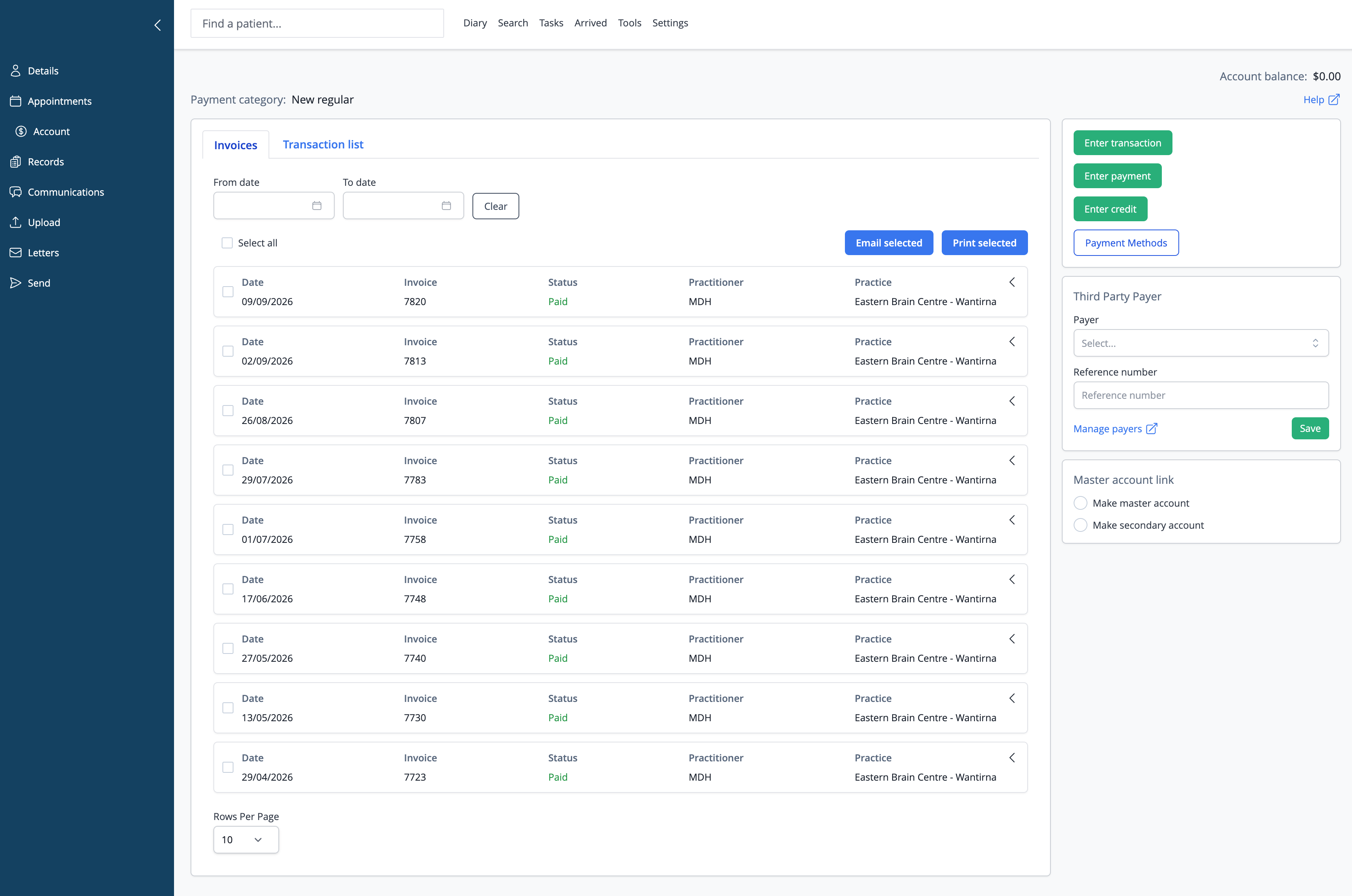
Most payments happen from the appointment while the patient is still at the desk. The Account screen is there when you need to review invoice history, manage payment methods, set third-party payer details, print statements, or tidy family account links.
30 days free. No credit card. No lock-in contract.
The problem
Billing slows down when staff have to leave the diary to finish the visit.
The patient is standing at reception, the appointment is already open, and the next job is simple: enter the transaction, take payment, issue the receipt, and book the next visit without detouring through separate billing screens.
The fix, in one line
Let transactions happen from the appointment, with the account there when deeper review is needed.
iconpractice supports transaction entry from the diary for day-to-day payments, while the patient Account screen keeps invoice history, account credit, payment methods, third-party payer references, statements, and master/secondary account links organised.
How it works
Take the payment in the visit flow, then use the account for review and housekeeping.
Open the appointment from the diary and enter the transaction without leaving the daily schedule.
Add services, products, classes, quantities, tax, saved cards, account credit, and supported claiming flows where relevant.
Use the Account screen to review invoices and transactions, email or print statements, manage payment methods, update third-party payer references, and keep family account links clear.
What it does
Billing that matches how appointments actually finish.
One invoice for the whole visit.
Services, products, and classes can sit on the same invoice, with quantities and tax handled per line item.
Take payment the way the patient needs.
From the transaction flow, split a payment across up to three payment types, apply account credit, or charge a saved card through the practice's connected Stripe account.
Save credit cards without taking numbers over the phone.
With Stripe connected, staff can send an SMS link so the patient can add their own card securely, then manage saved cards from the account workflow.
Claims live in the payment flow.
Medicare, DVA, private health, Comcare, iCare, WorkCover QLD, and WorkSafe VIC claiming can happen through the Tyro Health integration from the same transaction workflow.
Third-party billing is recorded properly.
On the Account screen, set an employer, insurer, or other payer with their own reference number instead of burying that detail in a note.
Stock sales update stock counts.
Sell products from the invoice screen and keep stock-on-hand and restock levels current without a separate spreadsheet.
Family accounts stay clear.
Master and secondary account links are managed from the Account screen, so one account can hold credit that applies to a linked family member's invoice.
Review and send account paperwork.
The Account screen gives staff a place to review invoices and transactions, then print or email statements and selected invoices when needed.
Bill and rebook together.
Because transactions can be entered from the diary, payment and rebooking stay in the same reception workflow.
See revenue at risk.
Daily invoice and payment reports sit alongside cancellations, DNA, and patients-not-rebooked reporting.
Accounting and claiming
Payments, claims, and accounting exports are built around the same billing record.
Tyro Health handles supported claiming flows from the transaction workflow, Stripe supports saved cards and online payments, and Xero receives takings grouped to match bank deposits. The aim is simple: whether the payment starts from the diary or the account, what was billed, what was paid, and what reached the bank should line up.
Works with
Connect billing to the tools around it.
Questions
Objections, answered.
Can one invoice include services and products?
Yes. A transaction can include services, stock or products, and classes on the same invoice, with quantity and tax handled per line item.
Can a patient split payment across methods?
Yes. One payment can be split across up to three payment types, including account credit where available.
Can iconpractice charge a saved card?
Yes. With Stripe connected, a saved card on file can be charged from the transaction workflow.
Can patients add a card without giving the number over the phone?
Yes. With Stripe connected, the practice can send an SMS link so the patient can securely add their own card, then manage saved cards from the account workflow.
Can someone other than the patient be billed?
Yes. A third-party payer can be recorded against the patient with its own reference number, so the invoice reflects who is actually paying.
Does product billing update stock?
Yes. Product sales entered through invoicing can update stock-on-hand and restock levels.
Try iconpractice free
Full access for 30 days.
No credit card. No lock-in contract. Opening a new practice? Your first 90 days are free. Switching from another system? We import your data for you, free.
No credit card required · No lock-in contracts